Showing posts with label review. Show all posts

Tuesday, October 25, 2011

Which smartphone is better? Compare iPhone, Android, Windows Phone, Blackberry? o_O

Most people want an iPhone if they have the money to get it, it has class, it is a status symbol in some circles. It is worth the money. Unfortunately, It also carries a lot of 'Apple' bullshit.

Next comes Android for the geeks, power users, value-for-money, Google services users, Android v4.0 is cutting edge. Unfortunately, droids have short lifes, low quality apps and market fragmentation which is its Achilles heel.

Next comes Blackberry for the suits! (iMessage & gTalk threaten BBM quite well). Perfect For Thumb-Jockeys. Design is inherently counterproductive to the whole 'touch' scene.

Next comes Windows Phone, a new contender due to the upcoming Win8, sure to make it big if Microsoft plays it right. Attracts Microsoft services users(Windows, MS Office etc), cheaper then Apple phones, connected with windows OS and Office products.
  • My first phone was an Android (HTC Desire).
  • My second phone is an iPhone 4.
  • My third phone will be Windows Phone 8.

iphone_4s_competive_specs

Most of those who advocate Android, I agree by the way, are actually 'power users' and are aware of the 'open source advantage' and the 'apple bullshit' I mentioned earlier. But if you go stand in a smartphone store that sells accessories for all types of phones then you will see a pattern emerge.

You have no idea how empowered a non tech user feels when there is only one button on a phone, it negates the very idea of 'what if I press the wrong button?/which button do I press?'! Try handing the iPhone 4 and the Samsung Galaxy S2 to your grandma(any non tech person, who by they way number more then the power users) and see which one she likes. For an average user an iPhone looks like the best choice because it provides a much more managed and smooth user experience. Android 4.0 is mainly targeted at a better user experience to combat this very area.

I am an Indian and Apple is most definitely a status symbol here as it was a couple of years ago in the US/UK. And as it is worldwide when the newest model is released.

The life of a droid – It starts dying as soon as it is born

  1. Android OS dev community churns out new features that have new hardware needs.
  2. This vanilla OS is then passed on to phone manufacturers who repack it with their own UI, features and branding. They also take the OS to the butcher table to fit it in the various kind of models they make.
  3. These phones are then passed on to cellular carriers who again modify the manufacturer's OS and apply their own UI, features(more like feature restrictions) and branding.
  4. Finally the user can buy the device and is very happy. Fragmentation is awesome till here.
  5. The inevitable happens, the android dev community churns out a new version. This is where the pain starts. The vanilla OS is not usable by the average user, unless they are power users and have rooted their devices and are ready to debrand their device.
  6. The new version then has to pass thru the drawing board of the manufacturer, who tailors it to fit the specific models and then it has to pass thru the cellular carrier's drawing board. This process takes a extremely long time. The manufacturer as well as the cellular carrier are both not very good or very fast at it and they dont like to spend money on it.
  7. In the end, the user gets the update very late and doesnt like it. In addition it dawns on the user that very soon the manufacturer and the cellular carrier will stop churning out updates for their specific model. They are profit oriented corps after all.
So a droid starts dying as soon as it is born.

An example: My HTC Desire. The latest HTC gave us is v2.3 on June 2011, It took HTC 6 months to churn out the update, vanilla release was on December 2010. HTC also stops supporting the device at that time.. This update is however not recommended for most users and wipes the phone, so officially it is stuck at v2.2 (the original version only). The hardware in the phone is however capable of running Android v4.0 which is the newest. But to get that on my device, I need to be a power user, root it, loose HTC Sense, wait for the community to port the OS to this device (which is very unlikely).

How old is this phone? Born on February 16, 2010 and died June, 2011. 16 months. R.I.P.
How many major updates it received: 1 (v2.1 to v2.2).


* HTC Desire akin to HTC Sensation at the moment. i.e a top of the line phone.


Android Development is messy at best

Google is working hard on trying to remove the manufacturer and the cellular provider from the OS-to-user pipeline. Experts call it one of the reasons for Google's takeover of Motorola. But alas I don’t think it can be fixed. It is the nature of the beast.

There are many other aspects of market fragmentation. The second main one has to do with apps and their quality. An app developer is constrained by the lowest common denominator when developing an app or the app wont function on all devices. The dev also has to handle a variety of screen sizes, performances issues and individual quirks. Never mind the need for the dev to own a number of devices(most droid devs dont have that much money!) to test the app and the extra work hours needed to have the app perform 'ok' on all devices. So due to this fragmentation the life of a droid dev becomes unnecessarily harder and is only worsened by super fast OS updates, new hardware etc.

The result is a low quality app because the hands of the dev were tied behind their back!
Just for a comparison, see the iOS (Apple mobile device OS) development. Apple guarantees that an OS update will work on all but the oldest models. There is a strict standard that the devs can rely on. There are high quality development tools available. The dev does not need to buy a bunch of devices to test the apps. The dev gets support from Apple. For all that they have to give up control and a larger profit share to Apple. It hurts but seems like the lesser of two evils.

Apple phones users have their own personal nightmares

  • Dependence on iTunes.
  • The feeling of being only able to do what Apple ‘allows’ as to do.
  • No widgets, advanced apps like File System browser, Advanced settings etc
  • The so called ‘major features’ like crop in photo gallery or snapping pics using the volume button, which should have been there right from the start.
  • Restriction on hardware peripherals, Apple devices are notorious to work up to their potential only when paired with Apple products.
  • From the developer POV, you have to pay a premium to get Apple hardware to develop apps, Apple eats up a large share of the profits, the app screening process are unfair with a policy effectively of ‘we are the kings, we decide your fate’.

Developing for the Windows Phone Platform

I have high hopes for this gambit because Microsoft seems to be keeping in mind both the issues. Market fragmentation will be lower then Android as Microsoft restricts the type of devices that can run Windows Phone 8 OS and provides a much better development environment then Android. Microsoft platform will also have less restrictions on what Apps can do or not and historically Microsoft has a lesser tendency to exert control on the platform, in comparison to Apple. Also, due to the large number Microsoft of users, any lockdown will be torn apart soon.

In the end all I can say is each phone/platform has its good and bad sides.

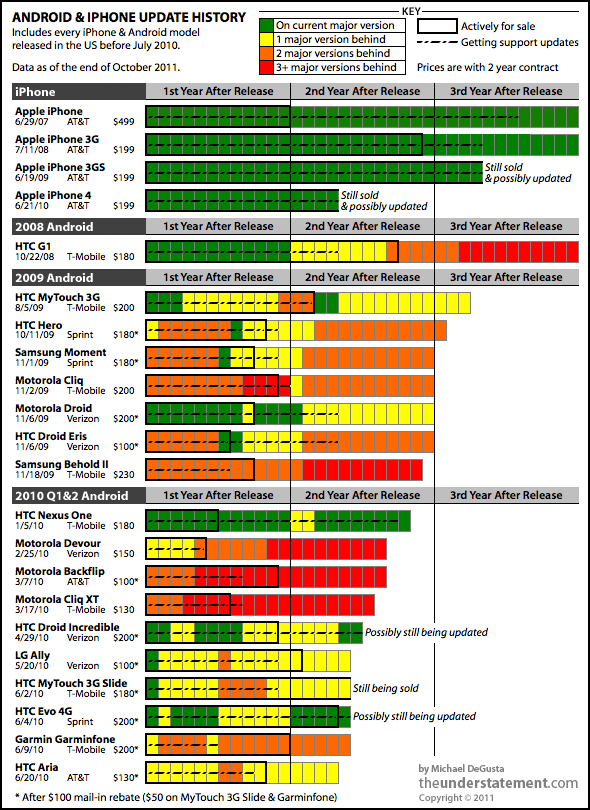
An update: A much more eloquent and more accurate article was posted about the Android updates issue by MICHAEL DEGUSTA which shows how Android updates fair.  It paints a picture much worse then I thought..

"It appears to be a widely held viewpoint that there’s no incentive for smartphone manufacturers to update the OS: because manufacturers don’t make any money after the hardware sale, they want you to buy another phone as soon as possible. If that’s really the case, the phone manufacturers are spectacularly dumb: ignoring the 2 year contract cycle & abandoning your users isn’t going to engender much loyalty when they do buy a new phone. Further, it’s been fairly well established that Apple also really only makes money from hardware sales, and yet their long term update support is excellent (see chart)." read more
* I am a developer on the web and mobile platforms so I do believe I know slight, just slightly, more then the average Joe. But please understand that that assessment is based on a very small 'data sample' and no scientific methods whatsoever. It is just my opinion.

Tuesday, December 22, 2009

Buying an Amazon Kindle 2 in India? Bollywood estyle!

Scene 0 – The hero spots the heroine. Love at first sight – General Specs
3644858-2-kindlekindle-willyoumarryme
First off, I purchased a Kindle 2 and am very happy with the product. It is what it is said to be and then some!
But acquiring this neat gadget is not so easy if you are in India. It makes for a neat story with a whole lot of bollywood style twists. Read: kicking the ass of the hero(me) for the whole movie and then unite with the heroine (kindle 2 global) right at the end. o-O.
Like everyone else outside the US, The hero went crazy for a few seconds when he learnt about the Kindle going international global :D He simply had to have it. Any science fiction bookworm would agree. Reading about awesome alien worlds and insane time-travel ideas on a comparably cool gadget is boundless fun.
So sit back, relax and enjoy the saga.

Aside from being extremely hot, the Kindle 2 is an amazing device. It’s form factor is surprisingly thin and E-Ink is so clear and easy on your eyes that it looks even better in the sun unlike other displays we are accustomed to. It can show a whole variety of file formats and for those it cant, one can find even more converters to get the job done. The Wispernet is great and covers almost all over the world. Via EVDO and falls back to 3G, EDGE and GPRS respectively based on the cellular service. It can charge via USB too and functions as a pen drive when plugged in.
Scene 1 -  The seduction – Geek specs
kindle-assemblydiagramIt uses a Lithium-polymer battery which does not degrade after each charge cycle. It has a processor faster then the Iphone. It has a Cellular modem that has hidden GPS features. It is extremely easy to use as it follows the minimalism  methodology set by google. It has stereo speakers albeit not a full blown MP3 player. It runs linux! and with some cool software you can easily be looking at the root prompt and happily compiling a custom kernel. It has many experimental features like a browser, picture viewer (manga), MP3 player, audio books and Text 2 Speech in addition to the million and one hacks out there in the wild due to the OS being linux. Oh and did I mention, an internet access is free.
All this in a 290 gram, super sleek, white hot body. The hero yells within ‘just take me. take me right here…’
Scene 2 – First date, her daddy is strict, no dates before marriage - Import fees and ways around
So, The hero trotted of to her home (Amazon.com) all giggly and bubbly and gobble up all the information on the new release and decided to ask her out on a date (check out the payment options).
The large import fees really made me mad and like all desi people couldn’t find it easy to pay the proper fees, need a jugaad shortcut. So I scour google with all the search trick i know. I find a few options like using one of those sites that provide you with a US address where you can ship the item and they forward it to you for a modest fee. The other one was a Chinese site selling Kindle at a much reduced price. However since kindle has a tiny cell phone for its eyes and ears I couldn't risk one of those options due to the fear of void warranty or wispernet not working.
So our hero wastes a lot of time on her from afar and finally succumbed to the Righteous ways. Marriage with the full 7 rounds. (i.e. the displayed $259 become $378.57). That is what girls do a guy’s pocket so the hero shouldn’t be surprised :)
Scene 3 – Family wants NRI - Payment options Credit card only
SpongeBob_Big_Drama_Lkindle1 Soon thereafter the first hurdle comes, You have to have a credit card which I dont have (a whole other rebellious policy I subscribe to but best left out of this post). It wiped the smile off my face. More days pass searching and looking for options. Come up with only two. Either get someone to buy it for you or get someone to buy you a gift card which can then be used to make the purchase. I was a bit worried as, like other mobile devices, they get tagged to the purchaser.
The hero doesn’t want some random NRI to marry her and bring her to him. She is too hot to be trusted with anyone else.
After some talk here and there I find another in the middle option, Get someone to buy it for you as a gift ! In such a case the kindle is unregistered and one can then register it themselves. However, that options is some what hidden and not easy to catch. There is only one option and that is gift wrapping and that costs further more money. God help our hero. However after reading a lot more text in amazon support on the not so easy on eye non E-Ink monitor I find that just select gift wrap and dont select any wrapping method and add some gift message text and you are done. The purchase is made via a trusted friend
RedHearts The heroine will stay single! All roads appear clear and our hero sings a couple of melodies. But he doesn’t know the mafia (whole shipping industry) is after her. The Mafia sends their minions all over the route. Will the heroine survive? Will they unite? The mafia is sure to be badass, what will the hero do?
Stay tuned for the next episode. Dont tell anyoneSecret telling

Tuesday, August 04, 2009

Windows 7, Visual Studio 2008 and Sql Server 2005/2008 are made for each other…. well almost.

It is like walking into a field of sunflowers with northern lights above and a bright and happy sun shining warmly on your face. That is what Windows 7 feels like. I got the Windows 7 iso(2.3Gb) floating around on the net and decided to try the 30 days trial ;) on my development laptop which is not even Vista certified!

Note: This is going to be a long haul. Feel free to skip and do what ever boring stuff you do normally.

…Setup Windows 7 without a DVD

Installing is a breeze with a pen drive so do the following and everyone around you will think you are a magician.

C:\>G:\Boot\BOOTSECT /NT60 H: where G is the mounted ISO(using UltraIso or similar) and H is you pen drive. After that copy all the content from the Win7 image to the pen drive as well. You are all set! Reboot and choose to boot from the pen drive. 10 minutes later you will feel the sun in your face :P

…Installing applications

The installation was swift with 3 restarts and all hardware detected automatically. One quick windows later I was up to date. I looked like I was on to a fabulous start. The performance was looking great and it was very stable. I then moved to the real deal stuff and the tedious job of downloading and installing everything. Firefox, Chrome Faststone, 7z, uTorrent, AVG Free, Atomic clock, Google Desktop, Windows live components(which is what I am writing in right now), CutePDF, Skype, Gtalk, Synaptic Touchpad utility and you know all the odds and ends I could remember. My previous XP was loaded and server me well for 1.2 years without fail. I was hoping to stay on the same steady road but with all the jazz of the world :D

…Importing settings and customisations

None of the above mentioned stuff gave any warning or error and installed blazing fast thanks to the Windows 7 installation routine revamping. However then came the crazy task of importing setting and customizations that accumulate with time on one’s PC. I did uTorrent, Media Library(which was going to prove useless against the supreme Windows 7 Libraries function), Atomic Clock, Google Desktop gadgets and Index files, Skype History etc. They all were marvellous and did I say no errors or compatibility issues yet?

…Using Firefox profile from Windows XP

Well the sweet part was over after that and came the crazy stuff. I had to import my Firefox profile, you know with the extensions, history, sessions, passwords and all that, which is usually very easy to do but I hit a mental block for some reason and it would work for the longest time. Firefox profile is something that I would start using Win98 to get it working! What is a guy without his internet history, bookmarks and passwords?

Anyway there were two problems. First, I was putting it in the wrong location. %AppData% in is AppData/Roaming not in AppData/Local Dugh! and Second to make it work you have to use “Firefox.exe –profilemanager” and create a new profile. After that close Firefox and replace all files in the new profile from you precious one and lo and behold you are back!

…Installing SQL Server and Visual Studio

Well I have to say it, this was the toughest. Mainly because there is so little information about Windows 7 (not the RC) on the net. As soon as you start the setup you will be bombarded with a few ‘known compatibility’ messages which were ever so frequent in Vista. If you install anyway you wont get anywhere as the SQL native client wont install and thus the Database service wont install. The simple thing is to download the SP3 streamlined setup of SQL Server 2005 or 2008 from Microsoft and if you cant then extract the SP2 or earlier setup with 7z and manually run sqlncli.exe for the native client. After that It should install smoothly. Just remembered, before all this, remember to setup IIS if you are going to do SQL CLR Debugging and in general Managed debugging using IIS and Visual studio 2008. Follow is very neat guild.

Visual studio and ASP.NET MVC install without hiccups. Remember to install the newest service pack though. It is also very easy to import your previous visual studio settings file and keep you visual studio theme too. And most important don’t forget to install Monaco font! :)

…IIS 7.5, SQL Server, Debugging Quirks

I ran into a couple of problems that you might too. I had to dig around the net for a loooong time and do a lot of trial and error to fix the solutions.

1. Create a Application under default website and run into a wierd problem. The default page doesnt load. For Eg. http/localhost/MyApp/ will give a 404 where as http/localhost/MyApp/Default.aspx will open file. After a lot of trial and error I found out that creating a Virtual Folder and then right-clicking to convert to application solved the issue.

2. Server Error in '/' Application.

Cannot open database "<Database Name>" requested by the login. The login failed. Login failed for user 'IIS APPPOOL\DefaultAppPool'.

There are other, some will say better, ways to fix this problem but the simplest and fastest to get it out of way is to change the. Go to IIS Manager>Server>Applications Pools> DefaultAppPool>Right-Click>Advanced Settings>Change Identity to LocalSystem. This will allow debugging.

3. Cant find the right process in ‘Attack to process…’ Just check ‘Show Processes in all Sessions’ and select w3wp.exe. If you still cant find it then open your browser and open some page on one of the local applications or virtual directory hosted apps. IIS service is efficient so it terminates fairly quickly on idle. Reopen the Attach to process and you should find it there.

4. Debugger terminates debugging after a few seconds into break points etc. This one is out from the help pages in case you were too lazy to click the help button. This is another one of the performance enhancements in IIS. Click here for the fix. :)

…Development tools

I use a whole bunch of tools around my Visual Studio and wont list them all. Here are few of the prominent ones. I installed Web Deployment projects addin, TortoiseSVN, Codesmith, netITers, Code Rush, Refactor pro, Red Gate SQL Toolbelt, ANTS Profiler, SQL Profiler, Sql Server Business Studio, MS Charts.. etc They all worked fine without any error or compatibility issues.

…Library and Home group

It is a revolution! These two features alone are enough to tell you something good is here. I was able arrange everything in my Laptop and my Gaming PC in less then 30 minutes. Which I was unable to do for the past years!! This will be awesome to the extreme when they release some kind go installed for earlier OS and I able to use it with the new NAS I am planning to buy for a 4TB+ storage.

However there was a problem that will possibly hit half the users. I spent 2 hours trying to connect both the PCs together in a home group. The process is very simple, you enable home group and are shown the password. Just click join on the ot

her systems and enter the password. All done… Not. They say a rotten apple can spoil all the others in the basket. That rotten apple is the team lead for the home group feature. They don’t tell anywhere that the time on both the machines have to be accurately matched! At the very least when you enter the password it should report and ‘Dude correct the time’ instead of a lame ’ Wrong Password’ message. Just enable internet time sync or do once to fix it.

...Windows Media Center

Probably the only thing keeping me sane. I love windows media center. I only run vista on my PC just to watch movies. internet radio, Music and what not. Especially with the Logitech s510 Media Remote makes is home theater heaven. The one in Win7 is quite imporved and fast like everything else. I detected my Pinnacle i110 right off the bat and download the TV Guide in a jiffy. After that I was surfin' the tube.

…Conclusion

I have been using Windows 7 for 3 days will all the above and a lot more. Win7 increases productivity a lot as well by making everyday things easier. I tried a lot of other stuff like ReadyBoost with 8gb pen drive, BitLocker and the revamped accessories like Programmable calculator and MS paint. Some benchmarks actually are much better then XP like in graphic intensive or multitasking software. The XP emulator is also apparently to die for, I was not able to try it since it requires a large amount of ram, disk space and virtualization capable CPUs. The upcoming Visual Studio 2010 and .net 4 are also being tailored for Windows 7.

It is quite possible I am in love…. ….again. Ciao.

Thursday, May 07, 2009

Windows 7 RC1 - Ready to plunge in

Well it is that time again. Another new windows version is about to be unleashed upon us. So, be good little geeks and dive headon. Worry about the breathing gear later.


That is how it is always with windows, but there is a bit of hope this time. may be we can dare to have a good feeling..


Check out an article on engadget on this.

Personally I am interested in the Windows Media Center. i hope it has received a generous amount of jazzing up :)

Saturday, September 29, 2007

The best latest torrent soruce - Releaselog

This is a website that is my homepage now and that alone aught to speak a ton about it. You know all that time you spend in searching for a good torrent for a new releases in the scene, now you don't have to wait for the seed to catch up so that you be sure that you have found an authentic torrent.

Now, Just read the Releaselog!

It caters to a variety of content but mainly the very newest in PC games (hear! hear!) , Tv shows and all types of movies the scene releases. You will find Dvdrip, telesync, Cam, HD, R5, Old movies and what not. From what i have seen this site does a superb job of keeping up with the scene, which can be very daunting. Within minutes of a release you will find a informative and concise article consisting of an introduction, beautiful images, releasing group info, System requirements, features and a lot more about the torrent. All the best groups like Fairlight, Hatred, Reloaded and all the other big boys can be found mentioned here.

You think that is a lot? But wait there is more! Oh yes.

You will also find hundreds of very properly moderated comments with each post and categories for Technology news, music and Applications with all the love of a scene lover glowing out from every bit of the site. I know what you are gonna say. Where the hell has it been till now if not as your homepage!!!

Go get em all Fellas!

Tuesday, August 07, 2007

Want ebooks? Get them at ebookshare.net

This is a amazing website for ebook lovers. The huge collection and categories is amazing. You will find all kinds of magazines, novels or study books. A perfect way to preview a ebook version before you put in your hard earned money in a paperback one.

The website is blog oriented design and presents an article each specifing every kind of detail you would want on a ebook or a ezine. ISBN numbers, ripping group, size, format, publisher and writer info, short description, link to publisher's site.. its all there.

The book download itself is via P2P torrent network thus providing good speeds and feedback. As the books get older and less popular they are phased out from the community. So, you might want to check the website periodically too grab what you like early on and before the sharing stops.

Some ebooks that are available are - Reader's Digest, You Magazine, The Ticket, Wrox Professional C# with .Net 3.0, Harry potter 7, Science, PC World, Computer power user... Basically everything you would ever want.

Here are the categories, at the time of writing this article, available at ebookshare (click to visit)-
Overall, you wouldn't want to miss such an important website. Also, you will need a torrent client to download the books, so get utorrent here. For information on torrent network see the wiki.

Happy Reading.

- Coming soon: A review of various ebook readers for all formats and reading habits -

Tuesday, March 27, 2007

Citing Wikipedia? Read this first…


Are you a wiki fan? Do you have the compulsive nature of automatically going for wikipidia?org when u want to know about anything? Are you amused by the top bunks that wiki occupies in Google search results? If yes then u need to understand the dual nature of information presented on wikipedia.
Lets first understand how Wikipedia get all that information? It is an open community encyclopedia that can be edited by anyone? Other then the rules of well formed structure, it does not tell us what not to write and how to define things. So it becomes very possible that a user writes or edits a topic on which he is not an expert or the user thinks that he has the correct information. Since there is no authority to validate that information, it becomes a very real possibility for the published information to be incorrect. But from the view of a user of that information, the popularity and enormity of the wiki foundation makes it easy to believe that the contained information is correct. Thus, the information looses credibility and becomes contradictory with the concept of citation. For a primer here are a few excerpts for the web-

History Department Bans Citing Wikipedia as a Research Source
By NOAM COHEN Published in New York Times, February 21, 2007

Dr. Waters and other professors in the history department at Middlebury College had begun noticing about a year ago that students were citing Wikipedia as a source in their papers. But the errors on the Japanese history test last semester were the last straw. At Dr. Waters’s urging, the Middlebury history department notified its students this month that Wikipedia could not be cited in papers or exams, and that students could not “point to Wikipedia or any similar source that may appear in the future to escape the consequences of errors.”


Referencing Wikipedia? Use Caution
By Kevin Garcia (The Brownsville Herald ) January 24, 2007

To many, Wikipedia is a godsend. It's a way to find information on any topic quickly and easily. What some fail to realize, however, is that nothing on the Web site can be taken at face value. Anyone, from age 8 to 80, from a high school dropout to a rogue scholar, can edit the online encyclopedia. Wikipedia can actually be a good source of information. It can lead people to any number of ideas that they might never have considered. That's the beauty of mass media. What Wikipedia is not, however, is a credible source.


When it comes to Computer Science, don't reference Wikipedia
by Christopher Diggins written July 31, 2005

This is not the first time a Wikipedia computer-science definition has made me want to pull my hair out. In the end I don't care, as long as people don't make the mistake of taking Wikipedia definitions seriously. Just remember that in Wikipedia the definitions are written by random people, and edited by random people, not experts.


  • It is not all bad, wiki is a very good source for information about any topic. But considering it’s use as a credible source of information is not good. There are many more such articles that advice people not to use Wikipedia for citation and every user should try and find a credible source for information for such purposed.

Monday, March 12, 2007

(Vista & XP)Share saved games between multiple OS

Introduction

With the release of vista I was excited and noticed that the era of multiple operating systems had returned। Just as when XP was released Computer enthusiasts had both 98 and XP installed. Similarly since the launch of Vista a lot of people now have vista as well as XP installed.

Problem

With multiple OSes we definitely have problems like installing software twice. But a lot of Software and applications can be run from the same location. For example games. Say u were playing NFS MW in XP. You install vista and want to play MW, You have two options, ONE, do the tiresome job of either copying the saved games from the XP drive to the vista drive(and then back if u want to play from XP again) or TWO, restart the system to XP. It is very inconvenient.

Solution

The best solution i came across is to create virtual folders(aka Hard links, Special Folders. not Virtual folders feature in Vista). What we want to do is have the actual save game files in one location, like XP, and create a virtual folder linking it to them from vista.

Assumptions
  1. XP installed in I:\Windows
  2. Vista installed in C:\Windows
  3. Games installed in D:\ (eg "e:\NFS Most wanted") (can be anywhere)
  4. MW creates saves in XP "I:\Documents and Settings\%username%\my documents\NFS Most Wanted"
  5. Req. virtual folder in vista at(MW creates saves here in vista) "C:\users\%username%\documents\NFS Most Wanted"
  6. Substitute drive letters, directory and username to ur system specific
  7. BACKUP YOUR DATA BEFORE MOVING FORWARD!

There are many options to do this like-

  • mapping a folder to a drive then mapping that drive to another folder
  • using DOS Commands like SUBST and FSUTIL
  • Shell extensions(playing with objectID, BirthvolumeID etc and desktop।ini scripts)
  • Windows Resource kit utility - linkd.exe

These options are messy, unless u r a 5 year veteran Linux admin। After a lot of very hard searching I found the utility called 'Winhardlink'. It does all the dirty work for You. You just have to specify the source directory/file and the target directory/file.


About WinHardLink
- Homepage - Direct Download
Software License(free) - Size(563 KB (576,687 bytes))

Advantages of WinHardLink

  • Works on vista
  • Created Hard links work across OSes i.e. if u create it in vista it will automatically be available as a normal folder in the other OS even if this utility is not installed
  • XP cannot differentiate between links and actual folders
  • Vista shows a shortcut icon on the hard link but reports as a folder in properties

How-to (example using NFS MW and above assumptions)

  1. Download and install WinHardLink in one OS(say vista)
  2. Launch from start menu
  3. Select Hard Link>New Virtual Folder. a windows will pop up
  4. Click "..." against the 'Alias dir' to select the destination to "C:\users\%username%\documents\NFS Most Wanted" (You may have to create a new folder 'NFS Most wanted)
  5. Click "..." against the 'Source dir' to select the location of the saved game to "I:\Documents and Settings\%username%\my documents\NFS Most Wanted"
  6. Click OK.You are done.
  7. Make sure the checkbox is checked along the folder in the main window of WinHardLink।

Testing

  1. Browse to see that the folder exists
  2. Create a new text file in either folder and put some text in it
  3. Check the other folder for its existence
  4. Cross check by editing both files and re opening from the other folder
  5. They should behave as normal file folders
  6. Start the game and see that the profile is loaded
  7. Now u can play MW from any os without worrying about multiple सवेस

More Suggested uses

  • consolidation of saved games। i.e. u can move the all save games to a central location like "d:\saves\[game-name]" and create virtual folders in both OSes where the games expect the saved games to be. Now u can format/reinstall etc without disturbing saves.
  • When one drive is full u can move any folder to another location and just create a hard link for it in its place (see moving the whole MS office folder at the homepage above)
  • Use in conjunction with 'saved searches (aka virtual folders)' feature of Vista to have the ultimate control over data accessibility

Tested with- NFS MW, NFS Carbon(but there is some compatibility problem in vista in loading saves created in XP), Just Cause, Battlefield 2 & 2142, Fifa 07, PES6, GTA SA, MS Flight Simulator X, Visual Studio Projects, Portable apps launch icons, NOT tested with network folders.

Cheers. If you like this solution then please leave a comment.