-
Usurping shared resources like the desktop, system folders, task bar, registry, ... ("The whole machine is for my use.")
-
Can't turn off the app ("The only reason the machine would be on is to run my app, so I'll install an auto-startup service, a startup app, an Explorer plug-in, ...").
-
Resource hogging ("I can just grab exclusive access to files, database, or network connections when I launch and keep everything open.")
-
Interrupts workflow with pop-up messages, tooltips, alert balloons, taskbar messages, status messages, sound effects, ... ("Look at me! I'm working! Do you see me? I'm doing something!!")
-
Collateral damage ("I don't use that so I'll delete it.")
-
Race conditions ("Anything I do will stay that way forever until I change it.")
-
Security breaches ("I can expose everything on the machine, since I am the only one that will ever access it.")
-
Lack of interoperability ("My app has everything it needs so I don't need to support file export or cut and paste.")
-
No deployment ("I will never have to update or uninstall my app; they'll just get a new machine.")
Friday, February 26, 2010
My Application Owns the Computer!
Tuesday, August 04, 2009
Windows 7, Visual Studio 2008 and Sql Server 2005/2008 are made for each other…. well almost.
It is like walking into a field of sunflowers with northern lights above and a bright and happy sun shining warmly on your face. That is what Windows 7 feels like. I got the Windows 7 iso(2.3Gb) floating around on the net and decided to try the 30 days trial ;) on my development laptop which is not even Vista certified!
Note: This is going to be a long haul. Feel free to skip and do what ever boring stuff you do normally.
…Setup Windows 7 without a DVD
Installing is a breeze with a pen drive so do the following and everyone around you will think you are a magician.
C:\>G:\Boot\BOOTSECT /NT60 H: where G is the mounted ISO(using UltraIso or similar) and H is you pen drive. After that copy all the content from the Win7 image to the pen drive as well. You are all set! Reboot and choose to boot from the pen drive. 10 minutes later you will feel the sun in your face :P
…Installing applications
The installation was swift with 3 restarts and all hardware detected automatically. One quick windows later I was up to date. I looked like I was on to a fabulous start. The performance was looking great and it was very stable. I then moved to the real deal stuff and the tedious job of downloading and installing everything. Firefox, Chrome Faststone, 7z, uTorrent, AVG Free, Atomic clock, Google Desktop, Windows live components(which is what I am writing in right now), CutePDF, Skype, Gtalk, Synaptic Touchpad utility and you know all the odds and ends I could remember. My previous XP was loaded and server me well for 1.2 years without fail. I was hoping to stay on the same steady road but with all the jazz of the world :D
…Importing settings and customisations
None of the above mentioned stuff gave any warning or error and installed blazing fast thanks to the Windows 7 installation routine revamping. However then came the crazy task of importing setting and customizations that accumulate with time on one’s PC. I did uTorrent, Media Library(which was going to prove useless against the supreme Windows 7 Libraries function), Atomic Clock, Google Desktop gadgets and Index files, Skype History etc. They all were marvellous and did I say no errors or compatibility issues yet?
…Using Firefox profile from Windows XP
Well the sweet part was over after that and came the crazy stuff. I had to import my Firefox profile, you know with the extensions, history, sessions, passwords and all that, which is usually very easy to do but I hit a mental block for some reason and it would work for the longest time. Firefox profile is something that I would start using Win98 to get it working! What is a guy without his internet history, bookmarks and passwords?
Anyway there were two problems. First, I was putting it in the wrong location. %AppData% in is AppData/Roaming not in AppData/Local Dugh! and Second to make it work you have to use “Firefox.exe –profilemanager” and create a new profile. After that close Firefox and replace all files in the new profile from you precious one and lo and behold you are back!
…Installing SQL Server and Visual Studio
Well I have to say it, this was the toughest. Mainly because there is so little information about Windows 7 (not the RC) on the net. As soon as you start the setup you will be bombarded with a few ‘known compatibility’ messages which were ever so frequent in Vista. If you install anyway you wont get anywhere as the SQL native client wont install and thus the Database service wont install. The simple thing is to download the SP3 streamlined setup of SQL Server 2005 or 2008 from Microsoft and if you cant then extract the SP2 or earlier setup with 7z and manually run sqlncli.exe for the native client. After that It should install smoothly. Just remembered, before all this, remember to setup IIS if you are going to do SQL CLR Debugging and in general Managed debugging using IIS and Visual studio 2008. Follow is very neat guild.
Visual studio and ASP.NET MVC install without hiccups. Remember to install the newest service pack though. It is also very easy to import your previous visual studio settings file and keep you visual studio theme too. And most important don’t forget to install Monaco font! :)
…IIS 7.5, SQL Server, Debugging Quirks
I ran into a couple of problems that you might too. I had to dig around the net for a loooong time and do a lot of trial and error to fix the solutions.
1. Create a Application under default website and run into a wierd problem. The default page doesnt load. For Eg. http/localhost/MyApp/ will give a 404 where as http/localhost/MyApp/Default.aspx will open file. After a lot of trial and error I found out that creating a Virtual Folder and then right-clicking to convert to application solved the issue.
2. Server Error in '/' Application.
Cannot open database "<Database Name>" requested by the login. The login failed. Login failed for user 'IIS APPPOOL\DefaultAppPool'.
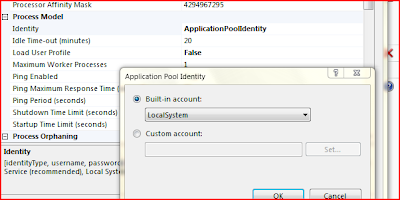
There are other, some will say better, ways to fix this problem but the simplest and fastest to get it out of way is to change the. Go to IIS Manager>Server>Applications Pools> DefaultAppPool>Right-Click>Advanced Settings>Change Identity to LocalSystem. This will allow debugging.
3. Cant find the right process in ‘Attack to process…’ Just check ‘Show Processes in all Sessions’ and select w3wp.exe. If you still cant find it then open your browser and open some page on one of the local applications or virtual directory hosted apps. IIS service is efficient so it terminates fairly quickly on idle. Reopen the Attach to process and you should find it there.
4. Debugger terminates debugging after a few seconds into break points etc. This one is out from the help pages in case you were too lazy to click the help button. This is another one of the performance enhancements in IIS. Click here for the fix. :)
…Development tools
I use a whole bunch of tools around my Visual Studio and wont list them all. Here are few of the prominent ones. I installed Web Deployment projects addin, TortoiseSVN, Codesmith, netITers, Code Rush, Refactor pro, Red Gate SQL Toolbelt, ANTS Profiler, SQL Profiler, Sql Server Business Studio, MS Charts.. etc They all worked fine without any error or compatibility issues.
…Library and Home group
It is a revolution! These two features alone are enough to tell you something good is here. I was able arrange everything in my Laptop and my Gaming PC in less then 30 minutes. Which I was unable to do for the past years!! This will be awesome to the extreme when they release some kind go installed for earlier OS and I able to use it with the new NAS I am planning to buy for a 4TB+ storage.
However there was a problem that will possibly hit half the users. I spent 2 hours trying to connect both the PCs together in a home group. The process is very simple, you enable home group and are shown the password. Just click join on the ot
her systems and enter the password. All done… Not. They say a rotten apple can spoil all the others in the basket. That rotten apple is the team lead for the home group feature. They don’t tell anywhere that the time on both the machines have to be accurately matched! At the very least when you enter the password it should report and ‘Dude correct the time’ instead of a lame ’ Wrong Password’ message. Just enable internet time sync or do once to fix it.
...Windows Media Center
Probably the only thing keeping me sane. I love windows media center. I only run vista on my PC just to watch movies. internet radio, Music and what not. Especially with the Logitech s510 Media Remote makes is home theater heaven. The one in Win7 is quite imporved and fast like everything else. I detected my Pinnacle i110 right off the bat and download the TV Guide in a jiffy. After that I was surfin' the tube.
…Conclusion
I have been using Windows 7 for 3 days will all the above and a lot more. Win7 increases productivity a lot as well by making everyday things easier. I tried a lot of other stuff like ReadyBoost with 8gb pen drive, BitLocker and the revamped accessories like Programmable calculator and MS paint. Some benchmarks actually are much better then XP like in graphic intensive or multitasking software. The XP emulator is also apparently to die for, I was not able to try it since it requires a large amount of ram, disk space and virtualization capable CPUs. The upcoming Visual Studio 2010 and .net 4 are also being tailored for Windows 7.
It is quite possible I am in love…. ….again. Ciao.
Thursday, July 09, 2009
Ever wondered about programming in Hindi !!
I started, as always, with google and ended up here on my blog which rarely meets anyone (including me).
Anyway I started a new project in Visual Studio 2008 and voila! Magic happens -
public class myClass
{
public void MyHindiTextFunction()
{
प्रबंधक<कंपनी<int>, List<कंपनी<int>>> प्रबंधक१ = new प्रबंधक<कंपनी<int>, List<कंपनी<int>>>();
प्रबंधक<परियोजना<Guid>, HashSet<परियोजना<Guid>>> प्रबंधक२ = new प्रबंधक<परियोजना<Guid>, HashSet<परियोजना<Guid>>>();
प्रबंधक१.प्रबंधित_इकाईयां.AddRange(new List<कंपनी<int>> {
new कंपनी<int>(1, "company1"),
new कंपनी<int>(2, "company2"),
new कंपनी<int>(3, "company3"),
new कंपनी<int>(4, "company4"),
new कंपनी<int>(5, "company5") });
प्रबंधक२.प्रबंधित_इकाईयां.Add(new परियोजना<Guid>(Guid.NewGuid(), "project1"));
प्रबंधक२.प्रबंधित_इकाईयां.Add(new परियोजना<Guid>(Guid.NewGuid(), "project2"));
प्रबंधक२.प्रबंधित_इकाईयां.Add(new परियोजना<Guid>(Guid.NewGuid(), "project3"));
प्रबंधक२.प्रबंधित_इकाईयां.Add(new परियोजना<Guid>(Guid.NewGuid(), "project4"));
प्रबंधक२.प्रबंधित_इकाईयां.Add(new परियोजना<Guid>(Guid.NewGuid(), "project5"));
//Select company where company id is in the Product's guid as string 0-o
var क्वेरी = प्रबंधक१.प्रबंधित_इकाईयां.Join(
प्रबंधक२.प्रबंधित_इकाईयां,
क => क.संख्या.ToString(),
(क, ख) => ख.संख्या.ToString().Contains(क.संख्या.ToString()));
}
}
public class प्रबंधक<इकाई_प्रकार, सरणी_प्रकार>
where सरणी_प्रकार : new()
{
private सरणी_प्रकार _प्रबंधित_इकाईयां;
public सरणी_प्रकार प्रबंधित_इकाईयां
{
get { return _प्रबंधित_इकाईयां; }
}
public प्रबंधक()
{
_प्रबंधित_इकाईयां = new सरणी_प्रकार();
}
}
public class कंपनी<कंपनी_संख्या_प्रकार>
{
public कंपनी_संख्या_प्रकार संख्या { get; set; }
public string नाम { get; set; }
public कंपनी(कंपनी_संख्या_प्रकार _संख्या, string _नाम)
{
संख्या = _संख्या;
नाम = _नाम;
}
}
public class परियोजना<कंपनी_संख्या_प्रकार>
{
public कंपनी_संख्या_प्रकार संख्या { get; set; }
public string नाम { get; set; }
public परियोजना(कंपनी_संख्या_प्रकार _संख्या, string _नाम)
{
संख्या = _संख्या;
नाम = _नाम;
}
}
}
I know I know.. Mad Scientist at work :) But is stands to reason that Generics and crazy LINQ is always fun and allows getting more hindi then you could otherwise :)
Further:
- SKTN - You have to watch his videos. I went LOL+ROLF
- add en2hi@bot.talk.google.com to GTalks :D
- VS2008 is not complete in supporting Unicode unless the underlying OS is. So Kick you XP and pirate Win7 (Tooltips, Intellisense etc are just square blocks)
- You can use the hindi transtation of numbers (१, २, ३..) as vars. That are still numbers :[
- Go to Control panel>Language Ops>Add Hindi keyboard and enable the Language Bar. After that start>Accessories>Accessibility>OnScreen Keyboard. Who the hell owns a hindi keyboard anyways
Note: XP goes crazy with hindi file and folder names and no one want to set Hindi as the primary language. Vista and Win 7 are much better if you rally want to try this.
Monday, July 28, 2008
Secure/Encrypted cookies in ASP.NET with System.Cryptography
In other words, beginners always have had difficulty in implementing a reliable yet flexible method for securing cookies. I have used the following code often and I am sure this will help anyone looking for a quick-fix solution to secure cookies.
The basic architecture is to create static methods to which you pass a cookie and get a encrypted version in return. It also conveniently retrieves the Algorithm to use as well as the key to encrypt/decrypt from the web.config file and can be adapted to retrieve/generate the key in other ways.
Step 1: Start off with our class.
using System.Security.Cryptography; //and other...
public class Security
{
//If you dont want ur methods to be static then use this and instantiate an object before use
//byte[] Key;
//string AlgorithmName;
public Security()
{
//If you dont want ur methods to be static then use this
//char[] chars = { ',' };
//string[] splits = ConfigurationManager.AppSettings["CookieSecurityKey"].Split(chars);
//AlgorithmName = splits[0];
//Key = new byte[Int32.Parse(splits[1])];// = KEY_64;
//for (int i = 2; i < Key.Length + 2; i++)
// Key[i - 2] = byte.Parse(splits[i].Trim());
}
...
You can store the key/algoritm name in the web.config like this:
Step 2: Create the basic methods that encode/decode a piece of string
Note: there methods are static so that you can use them directly from code without the additional line to create an object.
public static string Encode(string value, Byte[] key, string AlgorithmName)
{
// Convert string data to byte array
byte[] ClearData = System.Text.Encoding.UTF8.GetBytes(value);
// Now create the algorithm from the provided name
SymmetricAlgorithm Algorithm = SymmetricAlgorithm.Create(AlgorithmName);
Algorithm.Key = key; //you can apply your own key mechs here
MemoryStream Target = new MemoryStream();
// Generate a random initialization vector (IV), helps to prevent brute-force
Algorithm.GenerateIV();
Target.Write(Algorithm.IV, 0, Algorithm.IV.Length);
// Encrypt information
CryptoStream cs = new CryptoStream(Target, Algorithm.CreateEncryptor(), CryptoStreamMode.Write);
cs.Write(ClearData, 0, ClearData.Length);
cs.FlushFinalBlock();
// Convert the encrypted stream back to string
return Convert.ToBase64String(Target.GetBuffer(), 0, (int)Target.Length);
}
public static string Decode(string value, Byte[] key, string AlgorithmName)
{
// Convert string data to byte array
byte[] ClearData = Convert.FromBase64String(value);
// Create the algorithm
SymmetricAlgorithm Algorithm = SymmetricAlgorithm.Create(AlgorithmName);
Algorithm.Key = key;
MemoryStream Target = new MemoryStream();
// Read IV and initialize the algorithm with it
int ReadPos = 0;
byte[] IV = new byte[Algorithm.IV.Length];
Array.Copy(ClearData, IV, IV.Length);
Algorithm.IV = IV;
ReadPos += Algorithm.IV.Length;
// Decrypt information
CryptoStream cs = new CryptoStream(Target, Algorithm.CreateDecryptor(), CryptoStreamMode.Write);
cs.Write(ClearData, ReadPos, ClearData.Length - ReadPos);
cs.FlushFinalBlock();
// Get the bytes from the memory stream and convert them to text
return System.Text.Encoding.UTF8.GetString(Target.ToArray());
}
Step 3: Create the methods that encode/decode the cookie
public static HttpCookie EncodeCookie(HttpCookie cookie)
{
if (cookie == null) return null;
//get key and algorithm from web.config/appsettings
//Comment this section if you do now what this method to be static
char[] chars = { ',' };
string[] splits = ConfigurationManager.AppSettings["CookieEncodingKey"].Split(chars);
string AlgorithmName = splits[0];
byte[] Key = new byte[Int32.Parse(splits[1])];// = KEY_64;
for (int i = 2; i < Key.Length + 2; i++)
Key[i - 2] = byte.Parse(splits[i].Trim());
HttpCookie eCookie = new HttpCookie(cookie.Name);
for (int i = 0; i < cookie.Values.Count; i++)
{
string value = HttpContext.Current.Server.UrlEncode(Encode(cookie.Values[i], Key, AlgorithmName));
string name = HttpContext.Current.Server.UrlEncode(Encode(cookie.Values.GetKey(i), Key, AlgorithmName));
eCookie.Values.Set(name, value);
}
return eCookie;
}
public static HttpCookie DecodeCookie(HttpCookie cookie)
{
if (cookie == null) return null;
//Comment this section if you do now what this method to be static
char[] chars = { ',' };
string[] splits = ConfigurationManager.AppSettings["CookieEncodingKey"].Split(chars);
string AlgorithmName = splits[0];
byte[] Key = new byte[Int32.Parse(splits[1])];// = KEY_64;
for (int i = 2; i < Key.Length + 2; i++)
Key[i - 2] = byte.Parse(splits[i].Trim());
HttpCookie dCookie = new HttpCookie(cookie.Name);
for (int i = 0; i < cookie.Values.Count; i++)
{
string value = Decode(HttpContext.Current.Server.UrlDecode(cookie.Values[i]), Key, AlgorithmName);
string name = Decode(HttpContext.Current.Server.UrlDecode(cookie.Values.GetKey(i)), Key, AlgorithmName);
dCookie.Values.Set(name, value);
}
return dCookie;
}
At this point you have the basis setup and you can use the class in your code.
Encoding Example:
HttpCookie cookie = new HttpCookie("MySecureCookie");
cookie["ID"] = "39369a0d-975e-4456-9ade-3f04639fd309"; //recommended: use some unique value to later check for fraudulent cookies while retrieving
cookie["Name"] = username;
cookie["Email"] = email;
cookie = Security.EncodeCookie(cookie); //encode
cookie.Expires = DateTime.Now.AddDays(90);
Response.Cookies.Add(cookie);
...
Decoding Example:
HttpCookie cookie = context.Request.Cookies["MySecureCookie"];
cookie = Security.DecodeCookie(cookie); //decode
if (cookie["ID"] == "39369a0d-975e-4456-9ade-3f04639fd309") cookieChecksOut = true;
//process cookie
...
This code allows using a single generic implementation to use a variety of algorithms based on their merits and properties. I hope this will help a lot of beginners.
Friday, August 10, 2007
What was New in .Net 2.0
1. SQL server integration - This was a big change, dot.net 2.0 brought with it a CLR version of SQL server. Thus meaning that the three products .Net Framework 2.0, Visual studio 2005 and SQL Server 2005 were released in unison. This gave all the .NET compliant programming languages unprecedented direct access thru-code to database features like building Stored procedures, triggers and seamless use of DB data types. The new addition of the free SQL server express 2005 replaced the severely limited MSDE.
2. 64-Bit Support - It was a big leap forward when systems changed from 16-Bit to 32-Bit and now to 64-Bit. You can now build your applications in 64-Bit with just a simple options change in the Advanced Build page found under Application Properties. Microsoft worked hard to make sure that anything you built in the 32-bit world would work transparently in the 64-bit one. Moving to 64-Bit gives us some powerful addition like, most important of all, larger address space and larger primitive types. For the earthly folk 2^32 would give 4,294,976,296, while 2^64 will give you the humongous 18,446,744,709,551,616. Probably enough to could all the sand particles on all the beaches or something.
3. Generics - Any modern programmer worth his salt would tell you that generics are the stem cells of programming. With version 2.0 came the support for generics, a powerfull and efficient feature, enabling strongly typed collections. Generics can be applied to Stack, Dictionary, sortedDictionary, List, Queue, user classes, delegates, methods and many more.
4. Anonymous methods - This is a fairly known concept but was absent before .NET 2.0. It is a method to declare fictions that have no names and use them as delegates.
5. Nullable Types - Nullable types were built into the .Net framework 2.0 giving us the valuable feature of creating variables, thru generics, that can have Null values assigned to them. This made interaction with databases values that are null easier too.
6. Iterators - Thru the IEnumerable interface under the System.Collections namespace we can now use foreach on our own custom types and classes.
7. Partial classes - This is a new feature in .Net 2.0 and extensively inter-weaved with languages like C#, VB.Net, Asp.Net. This feature allows us to use the partial keyword before class declarations so that classes can span over multiple files and locations. Some uses are in the Visual studio designer to store all the initialization and property values of your project in a separate file and to implement code behind feature in ASP.Net.
Overall, these are pretty good features and advance .NET up many levels. We will soon see what in new in .NET 3.0 in comparison.